In order to link/authenticate your new library card number to an existing PressReader account, you can follow the steps below.
- Go to http://www.pressreader.com/ and click Sign in in the top-right corner of the page.
- Enter your email address and password, then click Sign In.
- Once logged in, click the profile (silhouette) icon in the top-right corner and select My Account.
Scroll down to the Social and Linked Networks section and click Edit next to Library or Group.
Image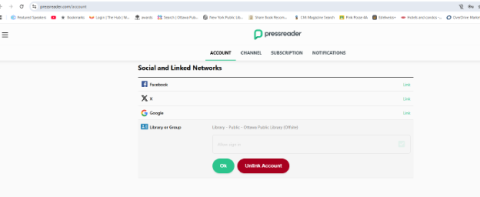
If a library card is already linked and you need to change it, click Unlink account first, then repeat this step.
- Select your library from the list, enter your library card credentials, and click Sign in.
Once the library card number is linked to a PressReader account, you can sign in using Library or Group with your library card number. This will automatically sign you in to the associated PressReader account.